- Go to the Settings page.
- Using the Navigator Bar, select Settings.
-or- - Click the Home button then, using the Settings Card, select Go to Settings.
- Using the Navigator Bar, select Settings.
- The Development Manager Settings page enables a DM Administrator to configure options that apply to all DM funds.
- Note the left side of the Administration screen pertains to DM Options while the right side pertains to Batch Management.
- Read each item carefully as they are really self-explanatory. Each option applies to all Batches/Funds/Pledges.
*OBO - on behalf of
DM Options
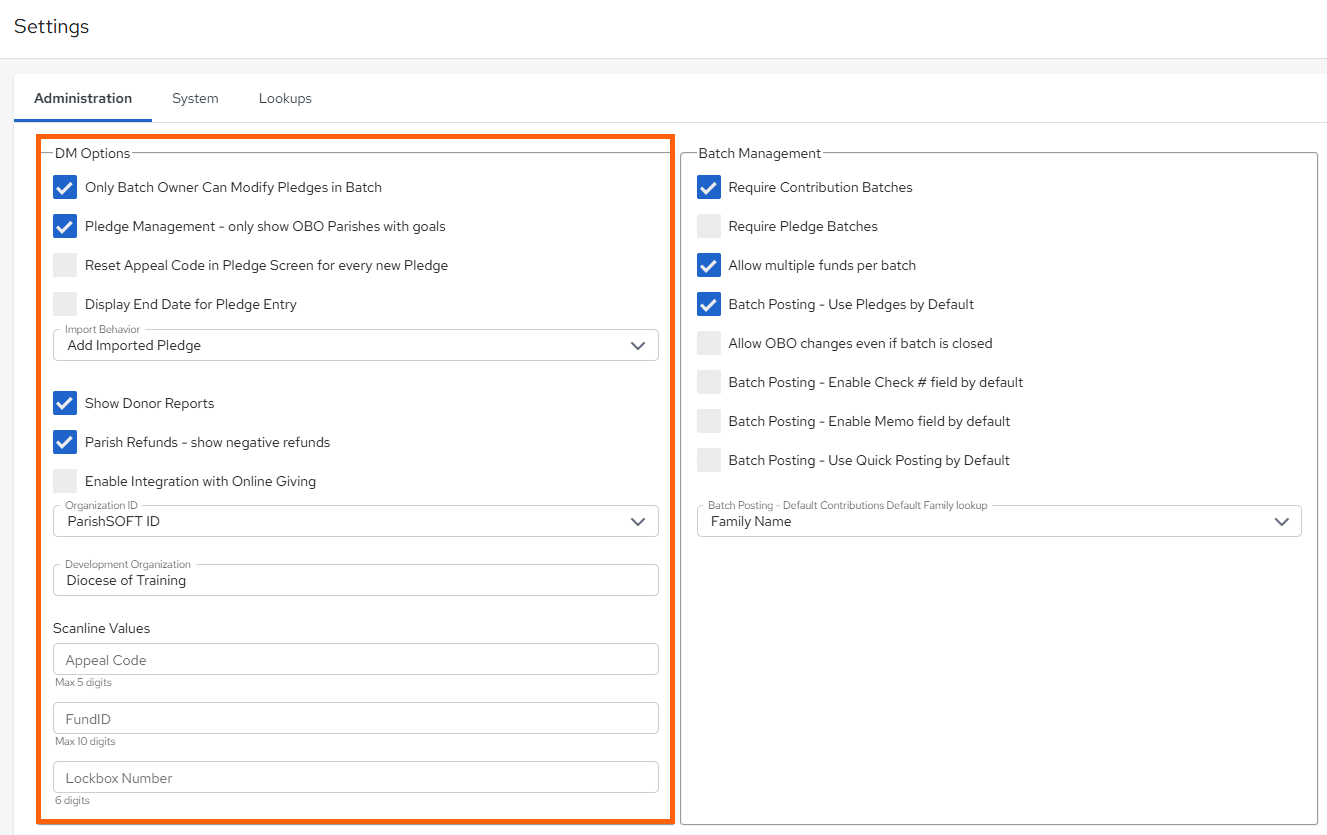
- Only Batch Owner Can Modify Pledges in Batch
- Pledge Management - only show OBO Parishes with goals
- Reset Appeal Code in Pledge Screen for every new Pledge
- Display End Date for Pledge Entry
- Import Behavior
- Add Imported Pledge
- Reject Imported Pledge
- Update Existing Pledge to Match Import
- Show Donor Reports
- Parish Refund - show negative refunds
- Organization ID
- ParishSOFT ID
- Local Org ID
- Development Organization
Updated